
CLT3-8 Exams:
Information for At-Home Testing
This page is designed to help with ordering, accessing, and administering your CLT3-8 exams. The information on this page applies only to tests purchased for individual use at home. If you are a school administrator, please see this page for ordering assistance.
If you are planning to order through Step Up for Students, please see this page for more instructions. If you are planning to order through your state's ClassWallet program, please see this page for more information.
CLT provides three testing windows a year for CLT3-8 students, one in the fall, one in the winter, and one in the spring. We recommend students test throughout the year to get the most accurate information regarding their progress. You are welcome to order for only one testing window if you would like, or order for all three.
CLT3-8 exams can be ordered through the CLT website. When registration is open, the dates will be listed on this page with a button linking to the order page.
If exams are ordered before the testing window, parents will be notified via email once the window has opened and the exams are available. If the order is placed during the window, the tests will be available within 2 business days after the order is placed. The registration deadline is approximately one week before the end of the testing window. Please see this page for the specific deadline.
We recommend that students take the exam that corresponds to their grade. For example, a student in 4th grade should take a CLT4 whether they are testing in the fall, winter, or the spring.
CLT3-8 exams are designed to be offered up to three times per year. In the fall, exams are scored using a norm referencing group of students at the beginning of their year. For example, a 5th grade student taking the CLT5 in the fall is compared to other 5th grade students who have just begun their 5th grade coursework. In the spring, that fifth grader will also take the spring form of the CLT5, but at that point, he will be compared against other students who are completing their course work for 5th grade. The winter testing period is designed to be used as a midyear assessment.
Administering exams throughout the year allows educators to establish a baseline and to measure their students’ progress in the key areas of reading, writing, and math, along with gauging their ability to apply reason to those subjects.
Yes, all exams are nationally normed using Lexile and Quantile measures. All exams will report these measures for students along with national user percentile norms. More than 35 million students in the United States receive Lexile and Quantile measures each academic year.
A testing window allows flexibility in administering exams. The window is generally between 4-12 weeks long and means that the exams can be administered to students on any day(s) during this period. The test must be completed by the last day of the window.
CLT3-8 exams have recommended timing and the test may be split up over several days, although individual sections should be completed in a single sitting.
If you have purchased multiple tests–for example, one CLT3 and one CLT5–they do not need to be administered on the same day, as long as each student tests within the testing window.
For information on how to start your CLT3-8 exams, please see this page!
When you log in, you may see the upper grade side of the dashboard originally.
To navigate between the high school and CLT3-8 dashboards, you will need to click the toggle in the top left corner of the page.
You can leave the profile on the high school dashboard blank or input your name. If you already have a 9th-12th grade test taker under the same email address, their information will appear here. The profile information must remain that of your high school student in order to accurately reflect their testing data. The name on the account will not impact the score reporting for CLT3-8 students.
Before you administer the test to your CLT3-8 student, you will roster them in your account. This is what will associate the exam and subsequent scores with your student.
In order to test, students must use a laptop or desktop computer with access to Wifi and have Firefox, Chrome, Edge, or Safari browsers installed on their device. The test may also be taken on a tablet.
Students are also required to have a responsible adult (age 21 or older) who will proctor the exam.
Sample tests are provided for educators to view the type of content and questions that are representative of that exam level.
Practice for CLT3-8 exams is not recommended as the exams are meant to provide information about a student's current level of performance to assist educators in meeting the educational needs of their students.
Test managers will receive log in instructions via email to their online test manager dashboard. For each exam type purchased, a unique Test Access Code is provided on the dashboard which students will use to access the online exams. Each student will also have a unique Student Test Code after they are rostered for the exam. This allows multiple CLT3-8 students to be associated with the same email.
The Online Test Administration Manual and Proctor Scripts can be found on your CLT dashboard a few weeks before the testing window. You will need to read the proctor scripts while you give your students the exam. If you have ordered multiple exam types, please pay attention to any differences.
How do CLT3–6 and CLT7–8 exam administrations differ?
CLT3-6 exams are comprised of two sections and have recommended timing of 40 - 50 minutes for Verbal Reasoning and 50 - 70 minutes for Quantitative Reasoning.
CLT7-8 exams are comprised of three sections and have recommended timing of 35 - 45 minutes for Verbal Reasoning, 25 - 35 minutes for Grammar/Writing, and 45 - 70 minutes for Quantitative Reasoning.
CLT3-8 exams can be split up over several days, but individual sections should be completed in one sitting. The entire test must be completed within two weeks of beginning it.
Who proctors the exams?
A responsible adult (age 21 or older) must proctor the at-home, online CLT3-8 exams. This can include parents or guardians. The Online Test Administration Manual and proctor scripts for CLT3-6 and CLT7-8 can be found on the CLT dashboard. Please take time to review these materials before proctoring your student's exam.
Can I administer the tests to multiple students at once?
Yes, you can! For example, parents with one student in 3rd grade and another in 8th grade can proctor both exams at the same time.
However, please note that the format of CLT3, CLT4, CLT5, and CLT6 differ from the format of CLT7 and CLT8. The number of sections and the recommended timing differs.
Can multiple students test on the same device?
You are welcome to use the same computer for multiple CLT3-8 testers! Be sure that you only have one test tab open at once. If you have multiple tests open at the same time, students may take the wrong exam. Be sure to fully close out of the test before having another student start their exam.
What is “recommended timing”? Is there a strict time limit?
There are no time limits for CLT3-8 exams. Recommended section times are provided for your planning purposes. We encourage you to allot enough time to complete a section in one sitting. In the event that some students have not yet completed their section and the allotted time is up, they may resume after a break or before the next section is to begin. Flexibility for students who do not complete the section in the allotted time should be provided.
Rostering your students means inputting their identifying information (name, date of birth, etc.) before they take their exams. Test managers are able to roster their CLT3-8 testers from the "Registrations" tab on the dashboard. For specific instructions on rostering, please see this page.
How do testing accommodations work for CLT3-8 exams?
It is the responsibility of schools, co-ops, and homeschool parents to provide accommodations for CLT3-8 that reflect what the student requires in their typical educational environment in order to equally access the exam. No application is necessary for CLT3-8 accommodations, but accommodations for high school level exams (CLT10 and CLT) require pre-approval by our team. You can see this guide for more information. Please contact cltaccommodations@cltexam.com if you have any questions.
Student score reports will be available on your CLT dashboard under "Analytics" once they are released. If you do not see them, be sure you are logging into the correct account. If you are still having trouble, feel free to contact info@cltexam.com.
When will scores be released, and how will I access them?
Scores will be released within 1 week from test submission. You will need to log into your CLT account and go to the "Analytics" tab to access your scores once they have been released. Be sure to adjust the test type and year/semester.
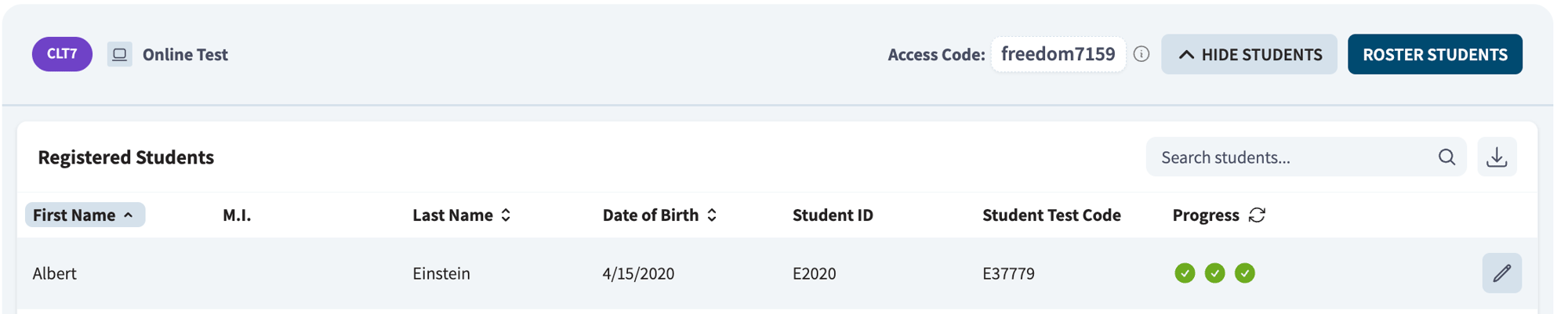
If you are not sure if the test has been submitted, you can check the progress bubbles on your student's registration. Completed exams will show all bubbles green with checks. An incomplete section will appear as a yellow bubble with three dots.
How do I interpret CLT3-8 analytics?
Our CLT3-8 Analytics Guide is a helpful resource for understanding test results. To watch a video explanation of CLT3-8 analytics, click here.
How can I download the score reports?
From your main Analytics page, first select the Test Type and Test Dates from the drop down options located in the dark blue buttons at the top right of the page. Next, select the "Show Students" button at the bottom of the page and find your student's name.
To download a copy of the student’s score report: click on the box with the arrow icon, which will pull up a pdf of the report. You can easily download from here! You can also watch this video for instructions on how to download your CLT analytics.
Can I test my student twice in the same testing period?
We do not recommend your students test more than once in the same testing period. They may encounter some of the same test content, so the second set of analytics would not be an accurate reflection of the student's knowledge.
We hope this has helped answer your questions about ordering, accessing, and administering CLT3-8 exams! Please reach out to info@cltexam.com if you have any more questions.