
Step Up for Students and CLT
This page contains order instructions for the full suite of CLT exams, as well as some frequently asked questions regarding Step Up for Students. Please see this page for more information about the CLT in Florida.
If you need additional guidance, please contact info@cltexam.com.
Order Process
For CLT3-8 exams, you will order a specific test type to be taken during the testing window. We offer one testing window in the fall, one in the winter, and one in the spring. The dates for the testing period are listed on the Step Up order page.
Once your Step Up order is sent to CLT, you will receive an email. CLT will create your account (if you don't already have one) and your registrations.
This email will also include instructions for accessing your account and exams. Once you log in, you can see the proctor manuals, administration guides, and other resources. Make sure you are toggled to the CLT3-8 side of the dashboard! The button to do this is in the top left corner.
If the testing window is currently open, please allow up to three business days between ordering and planning to test.
When you purchase a CLT10 or CLT through Step Up, you receive a test fee waiver code that can be applied to any applicable test date. You will need to select this specific date by registering on CLT's website. You must register through the CLT site before the registration deadline for your desired date.
You will receive this unique testing code via email within 2-3 business days after purchasing. This code is only valid for an exam during the academic year for which it was purchased. Please follow these step-by-step instructions to register:
1. Go to the CLT website to create an account or sign in to an existing account.
2. Once you are logged in, select ‘Register for a Test’ and select CLT or CLT10.
3. Select your desired test date from the drop-down menu and click ‘Register for Selected Test Date.’
4. Complete your student profile, or skip ahead to payment and complete it later.
5. Enter your unique testing code to complete your purchase. This will waive the exam fee.
Ordering Difference Between CLT3-8 and CLT10/CLT:
The primary difference in ordering a CLT3-8 and a CLT10/CLT is the way the registration is made. For CLT3-8 exams, the registration is made for you. For CLT10s and CLTs, we will provide you a 100% off discount code that you can then use to register for a specific exam date through your CLT account. The registration is not created for you.
Please make sure that you have looked at the full order instructions for the test types you are ordering. Note that the email address associated with your Step Up account will receive all communication from CLT. This will also be the email on your CLT account.
Frequently Asked Questions
What grade level should my students take?
Students should take the CLT3-8 exam that corresponds with their grade level. For example, if they are going into 5th grade, they should take the CLT5, regardless of the time of year! Fall tests are geared for students entering that grade level, while winter and spring tests are designed for students currently in that grade.
Can I have multiple students on the same account?
For CLT10 and CLT students, each student must have their own account under a unique email address.
For CLT3-8 students, there can be multiple students under the same test manager email. All exam registrations and analytics will be connected to this test manager account. Before students start their exam, they will enter their unique Student Test Code that will distinguish them from other students.
Where can I find my CLT3-8 tests?
After receiving the email about how to access your test manager account from CLT, you will be able to log into your CLT account and see your tests under the "Registrations" tab.
Be sure you are toggled to the CLT3-8 side of the dashboard! This toggle (pictured right) can be found in the top left corner.
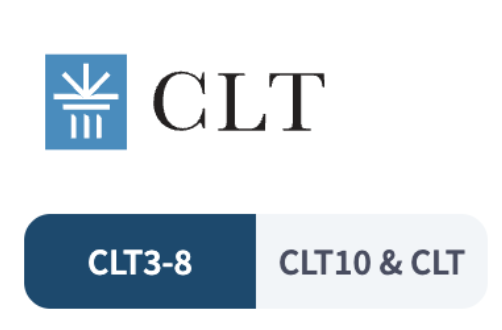
To begin the exams, you must first roster your student. Then, direct your student to test.cltexam.com to start their exam, linked at the top of the "Registrations" page under the test dates.
Where can I get an invoice with my student's name for Step Up reimbursment?
We can provide this to you! Please fill out the form on this page, and the invoice will appear at the bottom after submission. From there you can download it and submit it to Step Up. You can do this before or after the exam is taken. If you need assistance, please contact info@cltexam.com.
What if I need a refund?
If you need a refund for an order placed through Step Up, please contact info@cltexam.com We will handle cancelling your order and contacting Step Up.
How do I send my students' scores to Step Up?
For CLT3-8 reports:
From your main Analytics page, first select the Test Type and Test Date from the drop down options located in the dark blue buttons at the top right of the page.
- Next, select the "Show Students" button at the bottom of the page and find your student's name.
- Click on the box with the arrow icon, which will pull up a pdf of the report. You can easily print from here by clicking on the PDF icon at the top right of the page to view or download the file to print.
For CLT10 and CLT reports:
You can download your score report from the analytics button under your test score on your CLT dashboard! Once you select "Analytics", you will see a print icon in the top right corner of the page. Select that, and then you will have the option to download the score report to your computer.
When are scores released?
For CLT3-8:
CLT3-8 scores are available within one week of submitting the test. Please note that score notifications are not sent by email—you will need to log in to your account to view them. Make sure your dashboard is toggled to the CLT3-8 side (toggle located in the top left corner). To access the report, go to your Test Manager account and select “Analytics” from the menu.
For CLT10 and CLT:
Remotely proctored CLT10 and CLT scores are released the 3rd Wednesday after the exam. Students will receive an email when their score has been released. They will need to log into their account to see their score. For more information about scores and score sharing in Florida, please see this page.
Thank you for choosing CLT! Further questions can be sent to info@cltexam.com.