
CLT3-8 Online Test
Administration Manual
This is your guide to administering the online CLT3-8 assessments. Test managers must read this manual carefully prior to proctoring the test and adhere to the guidelines listed so that all exams are administered uniformly.
Please note that CLT has recently made improvements to the format of CLT3-8 exams. These improvements include timing changes, and for the CLT3-6, a reduction to two sections rather than four. This will allow for greater flexibility in exam administration. Rostering is also now required before students begin testing.
Customer Support
Please contact us via the live chat feature on our website should an issue arise that you are not clear on how to resolve. On weekdays during the testing period, CLT will have live online support from 8AM to 3PM ET for test administrators and proctors.
If the above does not work for you, try accessing the chat on your phone, email us at info@cltexam.com, or reach out to us via phone (443) 782-3733. If you are a school administrator and have questions related to ordering for other exam dates or test types, please contact your partnership director.
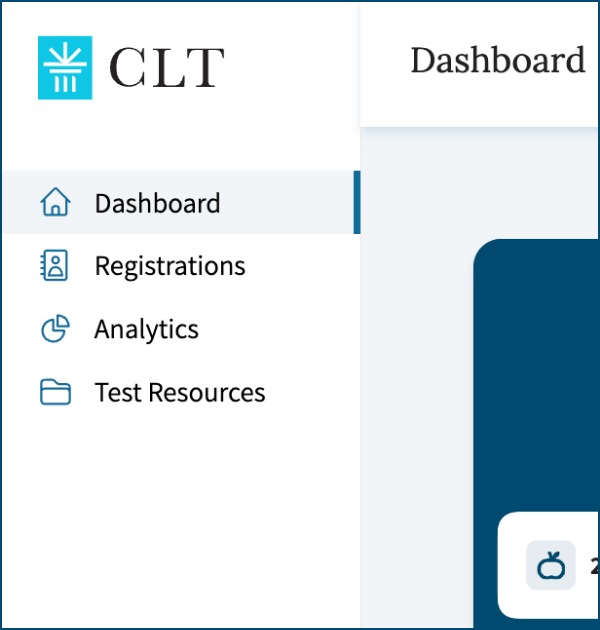
You can view upcoming tests, access codes, and relevant information for test day in your Test Manager Account. On the Dashboard, you can access:
- This administration manual
- Information on how to prepare proctors and start tests
- The Test Administration Report (complete after full administration)
Registrations: Here you will find the number of tests ordered, Test Access Codes, and Student Test Codes. The access codes will be visible two weeks before the testing window. You can edit student information here.
Analytics: This is where you will find scores/analytics once they are released.
Test Resources: This contains proctor scripts, sample tests, and other helpful documents.
Test Access Codes
In the Registrations section of your account, you will see a unique code for each test type you are administering. Each access code is unique both to your test manager account and that test type.
For example, if you are administering the CLT3, CLT4, and CLT5, you will have three test access codes (one for each type).
You must provide the correct access code to your testers. If testers fill in the wrong code, they will not be able to access the correct exam, it may not be correctly scored, or they may not be associated with your account.
Rostering your Students
Rostering your students means inputting their identifying information (name, date of birth, etc.) before they take their exams. Test managers are able to roster their CLT3-8 testers from the "Registrations" tab on the dashboard. For specific instructions on rostering, please see this page.
Student Test Codes
After you have rostered your testers for the exam, each individual student will have their own Student Test Code. The code will be visible on your administrator dashboard under the "Registrations" tab next to the Access Code.
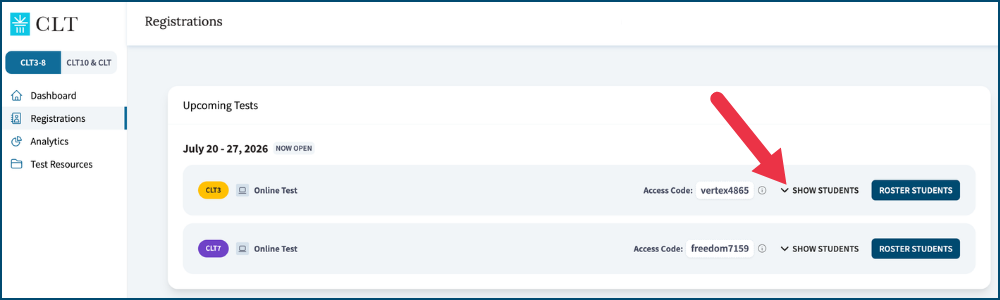
For ease of administration, you can download a list of the students taking each test type. This can be found under the "Show Students" button to the right of the search bar. This document will include all entered student information, as well as their unique Student Test Codes.
Registration Deadlines, Test Dates, & Score Release
Please note the dates and deadlines for your exam period. View the CLT3-8 page on our website for specific dates and registration deadlines.
CLT3-6 and CLT7-8 exams may be administered over multiple days, but each section should be administered within a single sitting. The entire test should be taken within two weeks. All exams must be submitted by the end of the testing period.
Scores for the online test will be released to your Test Manager Account within one week of submission.
Read this manual in full and review the appropriate proctor script(s). Make sure you can log into your Test Manager Account and view all test orders. Reach out via our online chat or email us at info@cltexam.com if you are not able to access your Test Manager Account.
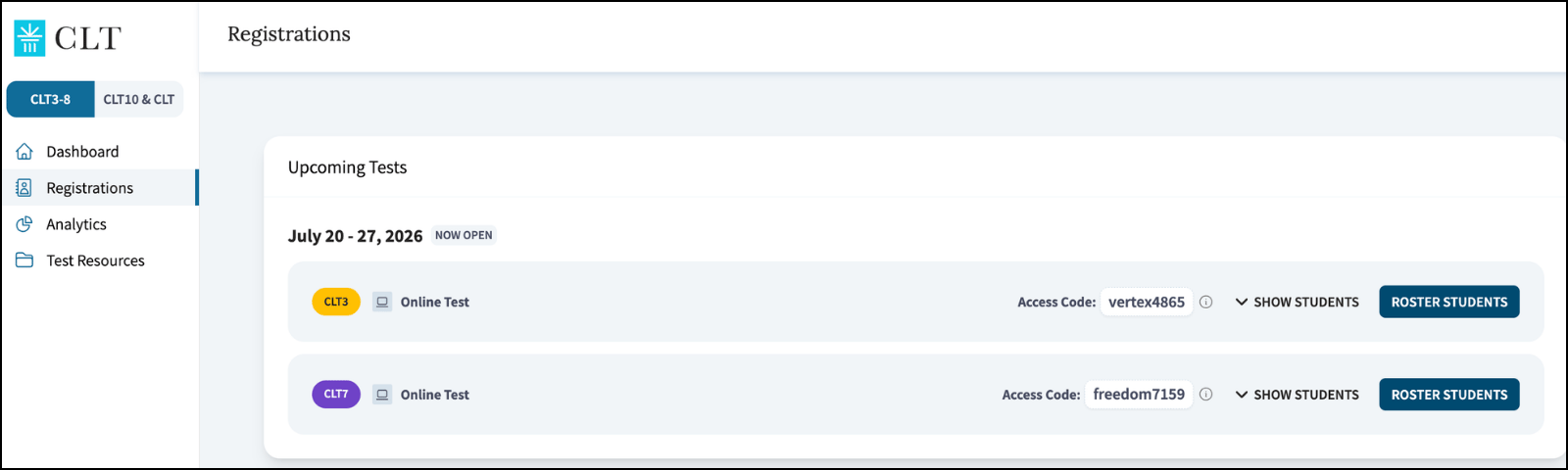
Your Registrations page will look like this. Please make sure you are seeing all test types you plan to administer.
If you need guidance for a student with a disability who requires accommodations, please review this guide. If you have students you anticipate will take longer than others, we would recommend you test them in a separate room.
Please contact cltaccommodations@cltexam.com if you have additional questions.
Tester Readiness
As the CLT3-8 is for younger testers, it is designed to be easily accessed by students who do not routinely complete schoolwork on the computer. However, there are some basic computer skills necessary to test.
Carefully review the following computer skills and ensure your testers are prepared to complete them.
-
- Type the following accurately:
- Test Access Code
- Student Test Code
- Scroll up and down
- Use arrow keys OR click with a mouse to advance test questions
- Click to select answers
- Read and follow simple instructions on a computer
- Type the following accurately:
Timing Guidelines
Timing for all CLT3-8 exams are recommended, and you will need to determine times for each section before the test administration. It is not necessary to allot the same amount of time for each section, hence the recommended ranges. Exam sections must be taken in order. Administrators should allow adequate time to complete the section in one sitting.
In the event that some students do not complete the section in the allotted time, they should resume the section after a break or before beginning the next section. If you must move on to the next section, reach out to CLT for guidance. Please recognize that the student's test may not be scored (if they complete fewer than 20 items in the section) or may miss some reporting subdomains if there is insufficient data to calculate the student's ability. Guessing to finish a section is strongly discouraged.
Testers who are unable to test with the rest of the class may test separately, at the discretion of the test manager. They must complete their test within a two-week period.
Key Differences Between CLT3-6 and CLT7-8
Below you will see the main differences between administering CLT3-6 exams and CLT7-8 exams. You can also see this document for a helpful chart.CLT3-6 exams consist of two sections. They may be taken in one testing period or split over two sessions.
Before administering each section, please allow at least 10 minutes to prepare the room, read instructions, and ensure all testers are prepared.
CLT3-6 Section Timing
-png-2.png?width=576&height=192&name=CLT3-8%20Section%20Timing%20(1)-png-2.png)
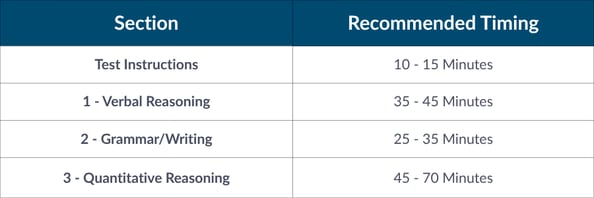
The CLT7 and CLT8 consist of three sections. They may be taken in one testing period or split over several sessions.
Before administering each section, please allow at least 10 minutes to prepare the classroom, read instructions, and ensure all testers are ready.
CLT7-8 Section Timing
Proctoring Arrangements
All CLT3-8 exams are proctored in person. As test manager, you are responsible for identifying proctors and providing them with required test day materials.
Please review the entire Test Administration Manual to be prepared to train proctors, assist testers, and manage the test administration. We recommend proctors also review this manual, and you may wish to provide proctor training to ensure all proctors are aware of the requirements.
There are three different scenarios by which the test may be administered: in-school proctored tests, parent-purchased and proctored tests, and home-proctored tests ordered by an online/hybrid school. Test managers are responsible for ensuring proctors have the needed information.
Please read the applicable paragraphs below in order to prepare and equip your proctors.
Schools can proctor in-person tests on their campuses. The school’s test manager will need to coordinate proctor selection, communication, and training, and may also serve as a proctor.
School proctors will receive instructions from the test manager, not directly from CLT. Proctors do not have to have direct access to the CLT Test Manager Account.
On weekdays during the testing window, proctors and test managers may reach out to CLT support for assistance via live chat.
In this case, the parent is the test manager and proctor. Parents who purchase tests for their children will either proctor the tests themselves or arrange for an appropriate proctor.
The parent can directly access the Test Manager Account, Test Access Codes, Student Test Code, and proctor materials.
On weekdays during the testing window, parents may reach out to CLT support for assistance via live chat.
Parents may proctor a test at home which was purchased by the school. This most commonly occurs when the school is virtual or hybrid.
In these cases, the school administrator is the test manager, while parents act as proctors only. Parent proctors will receive instructions from their school’s test manager, not directly from CLT. The school’s test manager is responsible for communicating with parents about how to administer the test at home.
These parent proctors will not have a CLT Test Manager Account. Instructions, access codes, and proctor materials must be distributed by their school’s test manager.
On weekdays during the testing window, parent proctors who experience technical issues may reach out to CLT for assistance. Parents should direct questions about orders and scores to the test manager, who can then reach out to CLT as needed.
Technology
Secure your testing space, tester devices, and a stable internet connection. The test will work on any tablet, desktop, or laptop computer running a Chrome, Edge, Firefox, or Safari browser.
Before a testing session, proctors or test managers should prepare testing devices by:
- Closing unnecessary applications
- Ensuring all computers are connected to the internet and a power source and have a functional mouse and keyboard
- Entering test.cltexam.com in either Chrome, Edge, Firefox, or Safari browsers and maximizing to full screen
- Ensuring the proctor has access to a device with internet access to open CLT’s online chat, the proctor script, and test administration materials
Facility (In-School/Group Testing Only)
- The exam should be administered in a closed, quiet room suitable for a standardized test. The room should be free of distractions with the lighting and temperature suitable for testing.
- Testers should be seated at least 4 feet apart from each other. This should go in all directions, measured from the testers’ devices.
- There can be a maximum of 20 testers per proctor. Testers should be seated at desks or tables and should not be able to see other testers’ screens. If it is not possible to maintain this distance, please secure another room and an additional proctor. It may help to maintain consistent seating arrangements across all administrations.
- Educational material, such as math or grammar posters, should be removed/covered. Partitions between desks are not allowed, as the proctor must be able to see all testers’ screens. Testers should have enough space to use their device and scratch paper comfortably.
-
- Test Access Code(s):
These will be shown on the Test Manager Account prior to test day. The test access code is different for different test types. Please check carefully to make sure you are providing the correct code for each test you are proctoring. - Student Test Code(s):
The codes will be visible on your administrator dashboard under the "Registrations" tab. Each student will have a unique code. Be sure to provide a list of these codes to your proctors. - Phone/Internet-Accessing Device:
The proctor should have a phone/device connected to internet to contact support. Our online chat is the fastest way of resolving most issues and will be available on the CLT website and your Test Manager Dashboard. - (Optional) Test-Day Sign:
Post this on the testing room door to remind others to remain quiet while testing is in progress.
- Test Access Code(s):
-
- Timer and Clock:
Proctors must have access to a timer and a clock, and the clock must be accurate and easily visible to all testers.
Proctors should time the test; it will not be timed within the online test itself. - Devices for Testing:
Testers must have a tablet, laptop, or desktop computer with stable internet and updated Chrome, Edge, Firefox, or Safari browsers installed on their device. Please note that the test is not compatible with cell phones.
- Timer and Clock:
Proctors ensure that test integrity is preserved by monitoring students while testing. Review the appropriate Proctor Script for a complete summary of proctor actions and announcements.
Requirements to Proctor
Proctors must be at least 21 years of age and able to see all testers and their screens.
Proctors may be related to the testers they are proctoring for the CLT3-8. CLT requires a ratio of 20 (or fewer) testers to one proctor.
All proctors must review at least the following materials prior to test day. This is necessary to ensure proctors are prepared to correctly administer the test.
- Proctor Responsibilities
- Proctor Script for the test that they are administering
- Facility Requirements (for In-School/group testing only)
Monitoring Testers
Proctors must pay close attention to testers and ensure instructions are followed. Keep all testers in view at all times. Proctors may not assist testers with exam content.
Students may not look at other testers' work or attempt to log in as another student. Proctors must ensure that testers do not access any of the following during the exam:
- Cell phones or other devices (must be completely off and out of sight)
- Calculators
- Digital watches with internet access, communication capabilities, or calculators
- Books/reference materials of any kind
- Snacks
Keeping Section Times
Recommended section times are provided for your planning purposes. We encourage you to allot enough time to complete a section. In the event that some students have not yet completed their section, they may resume after a break or before the next section begins.
Remaining in the Testing Room
Testers and proctors should remain in the testing room at all times for the entire test section. Do not leave testers alone before or during the exam session(s).
Maintaining Exam Security Before, During, and After Testing
All CLT exams are copyrighted and must not be copied, printed, or otherwise used outside of the test. Proctors may not alter, make copies of, or disclose CLT materials or other information to outside parties.
Proctors must also ensure that testers do not copy or otherwise duplicate exam material, such as by taking pictures of the test.
Proctors are responsible for reporting any rules or policy violations to the test manager and CLT as soon as possible. Please utilize live chat or email info@cltexam.com.
Setting Up the Exam
Proctors should prepare the testing room according to the Technology and Facility Requirements.
Proctors must ensure they have received the correct codes for the exam(s) they are proctoring and are prepared to distribute them to testers.
Completing the Administration Report
After the administration is over, test managers and/or proctors will complete the Test Administration Report.
Proctor Pre-Test Checklist
Before each test session, proctors must:
- Review test start and end times and ensure these fit with the administration schedule. The proctor is responsible for keeping predetermined time for each section. If your administrator has indicated that you will not be using the recommended times, please adjust your proctor scripts accordingly.
- Read through proctor responsibilities, noting prohibited items.
- Ensure all required items are on hand - including the appropriate proctor script.
- Make sure to have scratch paper and pencils ready for students at their testing spaces.
- Adjust the seating arrangements and room to meet testing room guidelines.
- Ensure devices are functional. Close all other applications and open your preferred browser to test.cltexam.com on all devices.
- Optional: post the test-day sign on the door.
Proctor Scripts
Proctors should have the following accessible on test day.
Proctor scripts for the CLT3-6 and the CLT7-8 can be found at the links below. When administering your test, please make sure that proctors are using the correct script.
Proctors should review scripts prior to test day to ensure that they are prepared to administer the test. Test managers are encouraged to send proctors the link to this online manual and the current online proctor scripts prior to test day.
On test day, log into your CLT account and go to the "Registrations" tab. Here you will be able to see the Test Access Code(s) and the Student Test Codes (if you have already rostered your student(s). Hover over the info circle to see the link to start the exam (test.cltexam.com).
.png "info circle (2)")
Testers will create their test session by entering their grade-specific Test Access Code and then the Student Test Code. This creates a test session to which a tester can return after a break, or, in a multi-day test administration, during the next testing session.
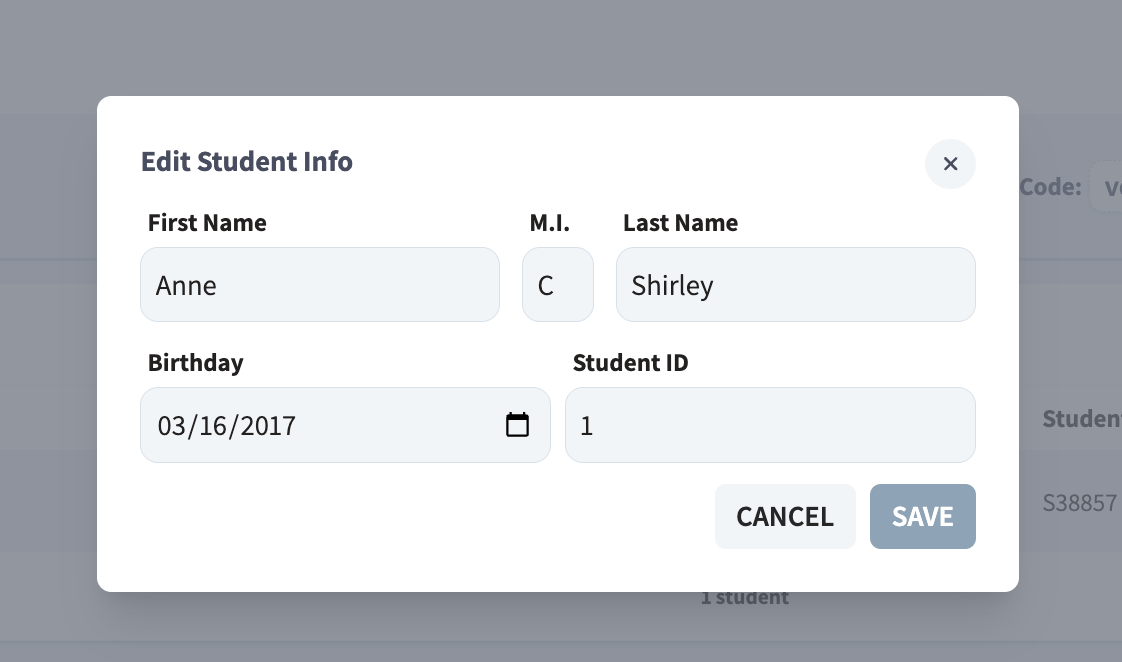
Testers will be asked to review and confirm their first name and last name initial. Proctors should also review and confirm accuracy.
.png "Edit Students 2 (2)")
3. You can update any needed information here.
Common Test Day Questions
This section discusses common issues that may arise while administering the CLT3-8. Please review this section before administration and have it available on test day.
Note: Because of the recent updates made to our testing platform, students taking the same test type will not all see the same test questions or passages.
If you have further questions, contact us via our online chat, available on the CLT website and your Test Manager Dashboard.
If the original tester information entered was incorrect and you wish your roster to be corrected, you can update this from your CLT dashboard. Please see Editing Tester Information for instructions.
If you are still not able to resolve your tester’s login issues, please reach out to our support team via our live online chat.
If you are experiencing an issue with the test display, try refreshing the screen. You can also try backing out of the test and opening it in a different tab or browser. Any entered answers are automatically saved.
If the issue persists, please contact us using our live chat.
If testers violate test integrity, like accessing an unauthorized device or resource, test managers/proctors should inform CLT via live chat or at info@cltexam.com. Proctors may, at their discretion, stop a tester’s exam and remove them from the exam room.
If a tester asks a question about exam content, encourage them to read the question carefully and try their best. Do not answer questions about the content of the exam or provide any other feedback.
If you have any questions or concerns about exam content, please reach out to our team at info@cltexam.com or use the live chat feature on our website.
Can a student return to a question/section they have already completed?
No, a student cannot go back to a question or section they have already finished. Once a student hits "Next", they are unable to return. If a student clicks through a section, we will be unable to re-open it. Please be sure your students are trying their best on all questions.
If a student finishes a section early, can they move on?
If you are administering the exam to one tester and they finish a section early, they may move to the next section. If you are testing a classroom of students, it is best to move them on in the same time frame. Students should be allowed to finish all test questions, if possible.
If you are unable to allow extra time for a student to complete the section, please do not have them guess on the remaining questions. Reach out to CLT for guidance.
Can students leave during the exam?
Each section should be taken in one sitting. If a students must take a break, they may resume the exam when they return. Testers may not access any resource material during this time.
Once you have completed your entire test administration, please complete the Test Administration Report. You need only complete one report per testing period.
Here you will note any testing irregularities that occurred during the exam. We also welcome feedback about your testing experience and our test preparation and instructions.
Scores will be released to your Test Manager Account within one week after test submission. If your testers will be submitting tests over a period of time, you will need to wait up to one week after the last tester has completed their exam to view all the score reports together.
Additional Reference Materials
If you are looking for a printable version of this manual, please see here.
Thanks for choosing CLT! If you have any questions after reading this page, please contact us at info@cltexam.com.