
Guide to CLT for
In-School Administration
Thank you for partnering with CLT to provide meaningful assessments for your students this academic year! We are grateful for your trust in our team and look forward to connecting with you in the coming weeks and months ahead.
This page provides a general reference for our CLT3-8, CLT10, and CLT testing procedures. It is not intended to replace our Test Administration Manuals, which provide comprehensive instructions for testing coordinators and proctors about administering the test.
For further CLT3-8 resources, see the Test Resources tab on your CLT3-8 administrator dashboard. If you have submitted an order but do not yet have access to your administrator dashboard, CLT will reach out to you in the next few weeks with your credentials.
Pre-Test Process Guides
For additional information on the pre-test process for in-school administration, you can see the following pages:
General Information
Communication Policy
Please ensure that the following address is in your address book so that your email does not flag our emails as spam or marketing: schoolsupport@cltexam.com.
It is CLT’s policy that we communicate all testing information to a single point of contact (test coordinator) at the school. It is the coordinator's responsibility to distribute information to the appropriate individuals responsible for test day preparations. If the test coordinator would like an additional person to receive test communication, they can specify this request and the individual on the order form.
CLT Points of Contact
- Sales and invoicing: For questions about ordering, invoices, and analytics, please contact your partnership director.
- School test administration support: For support with any operational questions related to test administration, please contact schoolsupport@cltexam.com.
- Accommodations: For any questions regarding accommodations through CLT, please contact cltaccommodations@cltexam.com.
- CLT phone number: Our number is (443) 782-3733.
CLT Test Suite
We offer CLT exams in the following types.
.png "Types and Modes of Test Admin (1)")
The schedule of communication can differ based on the test type. There are significant differences in the registration deadlines (deadline to submit an order) between online and paper.
See the test dates and deadlines documents for our current set of offerings, and speak with your partnership director to find out more about the specifics of different test modes.
First Steps
Please use the following order forms to order tests for your school. See the test dates and deadlines documents for our current set of offerings.
The online exam order deadline is 4 weeks before the exam. This is the recommended date to order by to ensure that schools and students are adequately prepared for test day.
The paper exam order deadline is 6 weeks before the exam. Please plan accordingly.
Please note that, for CLT10 and CLT, you must place an order before you import students into our system. Additional imports can be made after the import deadline.
For any billing and invoicing questions, please contact your partnership director.
Upon receipt of your order, CLT will create an administrator account for the designated testing coordinator. By default, this will be the person placing the order. They will receive all test day communication. An additional or alternate testing coordinator may be designated on the order form.
A CLT administrator account can be accessed by logging in at cltexam.com. It gives our partners the ability to:
- Access testing resources
- See Test Access Codes for CLT3-8
- View analytics for past tests
- Import/roster students for all exam types (see below for instructions)
You can request additional administrator accounts by emailing your partnership director.
Note: If you have submitted an order but do not yet have access to your administrator dashboard, CLT will reach out to you with your credentials.
Pre-Test Expectations
CLT communicates directly with a testing coordinator. This is the point of contact at the school who distributes administration information and coordinates the details of test day.
By default, the testing coordinator is the contact who filled out the order form. This role can be reassigned at any time by contacting your CLT partnership director.
If the person placing the order would like an additional person to receive test communication, they can specify this request and the individual on the form.
A general communication schedule is included lower on this page. Test day related emails will come from schoolsupport@cltexam.com.
Note: We do not involve proctors in the operational aspect of test administration. The testing coordinator is responsible for all internal communication, including to parents and students.
- All accommodations requests must be submitted 4 weeks before the test date. Requests submitted after the deadline are not guaranteed to be reviewed by your test date.
- For accommodations requests, the testing coordinator, or the party responsible for coordinating accommodations, will communicate separately with CLT’s accommodations department.
- Review the CLT Accommodations Documentation Guidelines before submitting requests.
- The accommodations portal is separate from the standard CLT account. Please see our page regarding accommodations information for school administrators for information on how to submit accommodation requests for each student.
- For ELL accommodations for students testing in school, please see this document.
Note: CLT3-8 students do not need to apply for accommodations. Administer accommodations according to your usual practice in the classroom.
Setting Up LockDown Browser (Only CLT10 and CLT)
All schools must install LockDown and verify their installation before test day. This page includes download and verification instructions. Students will launch LockDown and start their tests from their dashboards on cltexam.com on test day.
Importing/Rostering Your Students
To register a student for a particular exam, an administrator must import a spreadsheet of student emails. If a student does not already have an account, this action will create one for them in our system. We do allow additions to the test roster after the import deadline.
Students will use this email address to access their CLT account on test day and their scores after the test. If a student already has a CLT account under the email they are imported under, the import will not update their password or any account information.
CLT3-8
Rostering is also required for CLT3-8 exams. Rostering your students means inputting their identifying information (name, date of birth, etc.) before they take their exams. Test managers are able to roster their CLT3-8 testers from the "Registrations" tab on the dashboard. For specific instructions on rostering, please see this page.
Preparing your Proctors and Students
It is the responsibility of the testing coordinator to prepare proctors and students for test day. To do this, please read through the appropriate administration manuals and communicate with proctors.
-
Review exam overviews (CLT3-6 (Online), CLT3-6 (Paper), CLT7-8 (Online), CLT7-8 (Paper), CLT10, CLT) and share relevant information with proctors.
-
See the corresponding test administration manual for facility and technical requirements.
-
Communicate with parents/students about test day preparation/expectations.
-
If testing CLT10/CLT online: have students log into their accounts to troubleshoot login issues and fill out their account profiles.
-
If paper testing: check paper shipment to ensure all materials were received.
-
Read and share the appropriate administration manuals with proctors.
Test Day Support
CLT will provide customer service on test day itself via phones and live chat on cltexam.com. Administrators and proctors should use the live chat for the quickest response. The customer service team prioritizes the chat on test day over phones or emails.
Test Support Hours:
• CLT10 and CLT: 7AM - 5PM ET
• CLT3-8: 8AM - 3PM ET on weekdays
Test Scores
In School Online (CLT10, CLT): Weekday test scores are released on the Wednesday following test week. For Saturday tests, score release occurs on the following Friday.
In School Online (CLT3-8): Scores will be posted on your administrator dashboard within one week of submission.
Remotely Proctored (CLT10, CLT): The third Wednesday after the test.
In School Paper (CLT3-8, CLT10, CLT): Approximately 30 days after the receipt of answer sheets.
For answer sheet return instructions, please refer to your paper test administration manuals.
- CLT10 & CLT students: Scores will be available directly via their student accounts on the day of score release.
- CLT3-8 students: Testing coordinators must send the students the URL to their individual analytics.
For help interpreting your scores and analytics, use the guides below. You are also welcome to set up an analytics call with your partnership director.
Test Deadlines & Communication Schedule
CLT10 & CLT Schedule:
Note that this is a generic schedule. For deadlines according to a specific test date and test mode, see the test dates and deadlines document. Please note that the online order and student import deadline is recommended to ensure schools and students are properly set up for the exam. To place an order after the ordering deadline, please contact your partnership director. Roster imports after the import deadline are available, but will result in a shortened preparation timeline for students and proctors before test day.
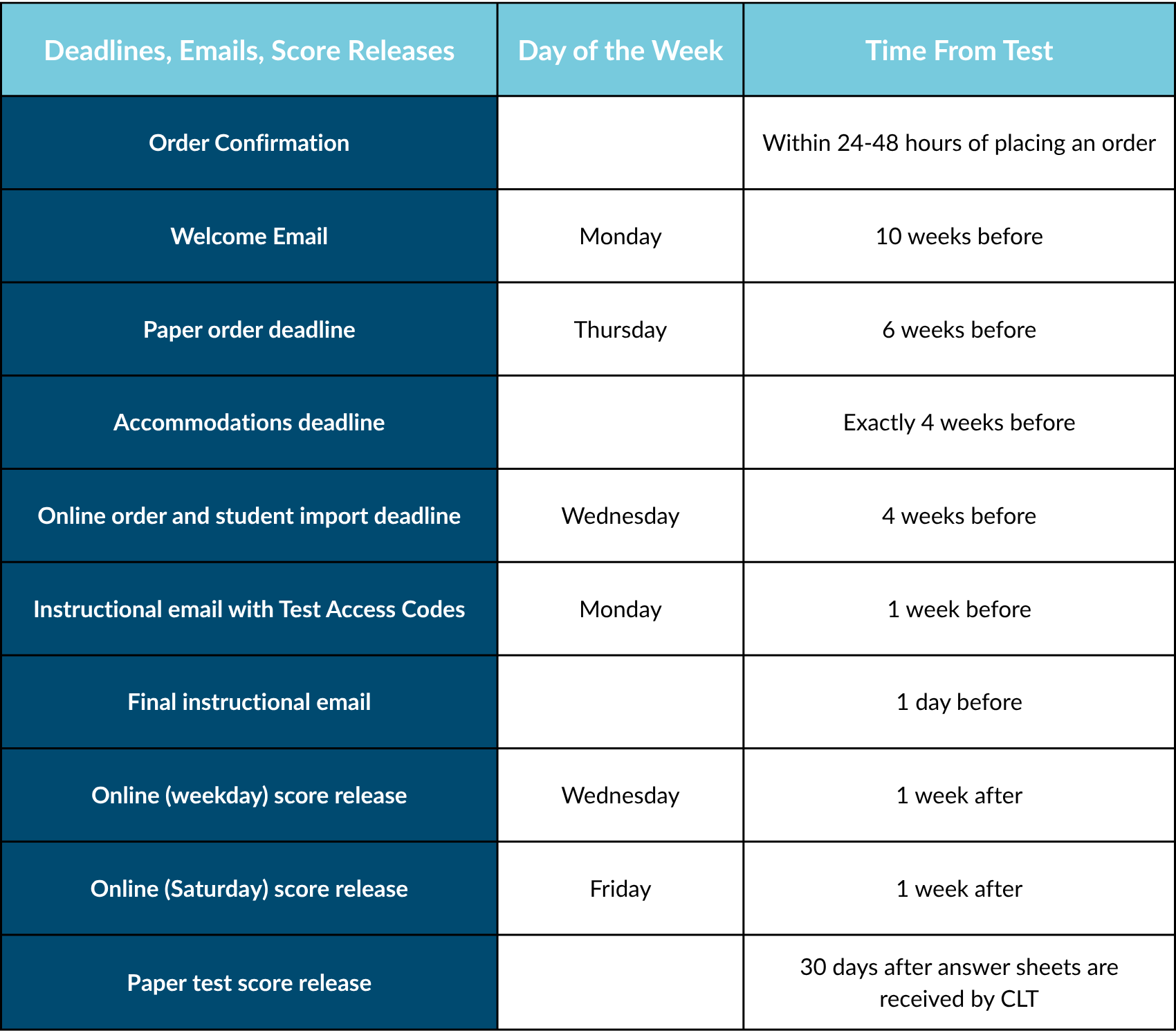
CLT3-8 Schedule:
The CLT3-8 communication schedule follows the published deadlines in the test dates and deadlines document. Informational emails regarding the CLT3-8 exams are sent at the beginning of the academic semester, one week before the testing window opens, at the beginning of the testing window, and one week before the end of the testing window (online only). To place an order after the ordering deadline, please contact your partnership director.
Business Hours
Regular Business Hours
• 9:30AM - 5PM ET
Test Day Support Hours
• CLT10 and CLT: 7AM - 5PM ET
• CLT3-8: 8AM - 3PM ET on business days
We are grateful for your partnership with CLT. If, at any time, you have questions about our testing procedures or need assistance, please do not hesitate to contact your partnership director or our school support team at schoolsupport@cltexam.com.